
The Best MIDI Keyboards of 2026, From 25 to 61 Keys
From a 25-key controller that fits beside a laptop to 61 full-size keys for two-handed parts: six MIDI keyboards for producing, beat-making and learning to play.
By Shahadat Hossain Published Updated
The short answer
Compare all 6-
No. 1 · Our top pick
Best Overall
- Key action
- 25 velocity-sensitive mini keys
- Weight
- 1.05 kg (2.31 lb)
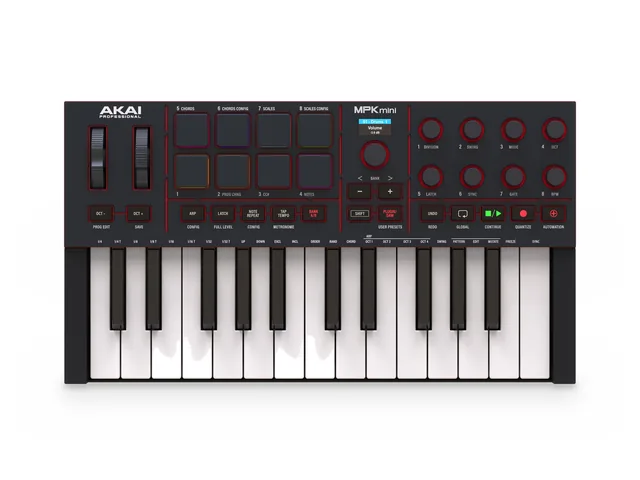
25 mini keys, 8 pressure-sensitive pads, 8 knobs, real wheels and a 5-pin MIDI out.
Main limitation Two octaves at a time.
-
No. 2
Best 49-Key
- Key action
- 49 semi-weighted, waterfall style
- Weight
- 4.08 kg
49 semi-weighted keys, 16 pads with polyphonic aftertouch and 9 faders.
Main limitation 73 cm wide.
-
No. 3
Best 61-Key
- Key action
- 61 semi-weighted, waterfall style
- Weight
- 4.78 kg
61 semi-weighted keys with the same pads, faders and DAW scripts.
Main limitation 89.5 cm wide and 4.78 kg.
-
No. 4
Best Mini Keyboard With Faders
- Key action
- 25 velocity-sensitive slim keys
- Weight
- 1 kg (2.20 lb)
The MiniLab 3 is the 25-key controller for mixing as well as playing: four faders and eight encoders sit beside its pads, and its pedal input takes sustain or expression.
-
No. 5
Novation Launchkey Mini 25 MK4
Best for Ableton Live
- Key action
- 25 synth-style mini keys
- Weight
- 0.78 kg
The Launchkey Mini 25 MK4 is the small controller for Ableton Live users: 16 pads launch clips and play drums, and in Live it adds sequencer, Drum Rack and clip modes.
-
No. 6
Best Keys-Only MIDI Keyboard
- Key action
- 61 full-size, semi-weighted, velocity-sensitive
- Weight
- 4.1 kg (9.0 lb)
The Keystation 61 MK3 is the MIDI keyboard for playing rather than programming: five octaves of full-size semi-weighted keys, AIR's Mini Grand piano included, and nothing between you and the keys.
One for each size: the MPK Mini IV for a laptop desk, the Launchkey 49 MK4 for both hands, and the Launchkey 61 MK4 for five octaves.
Compare all 6
Swipe the table sideways to see every column.
| Rank | Best for | Keys | Pads | Knobs and faders | Weight | Main downside | Amazon |
|---|---|---|---|---|---|---|---|
| 1Akai MPK Mini IV#1 · Best overall | A laptop desk | 25 mini keys | 8, pressure-sensitive | 8 knobs, no faders | 1.05 kg | Two octaves at a time | Check price on Amazon for the Akai MPK Mini IV (opens in a new tab) |
| 2Novation Launchkey 49 MK4#2 · Best 49-key | Producing with two hands | 49 semi-weighted | 16, polyphonic aftertouch | 8 encoders, 9 faders | 4.08 kg | 73 cm wide | Check price on Amazon for the Novation Launchkey 49 MK4 (opens in a new tab) |
| 3Novation Launchkey 61 MK4#3 · Best 61-key | Piano and synth parts | 61 semi-weighted | 16, polyphonic aftertouch | 8 encoders, 9 faders | 4.78 kg | 89.5 cm wide | Check price on Amazon for the Novation Launchkey 61 MK4 (opens in a new tab) |
| 4Arturia MiniLab 3#4 · Best with faders | Faders on a small desk | 25 slim keys | 8, pressure-sensitive | 8 encoders, 4 faders | 1 kg | Touch strips, not wheels | Check price on Amazon for the Arturia MiniLab 3 (opens in a new tab) |
| 5Novation Launchkey Mini 25 MK4#5 · Best for Ableton Live | Ableton Live | 25 mini keys | 16, polyphonic aftertouch | 8 encoders, no faders | 0.78 kg | 3.5 mm MIDI out | Check price on Amazon for the Novation Launchkey Mini 25 MK4 (opens in a new tab) |
| 6M-Audio Keystation 61 MK3#6 · Best keys-only | Learning to play parts | 61 semi-weighted | None | 1 volume fader | 4.1 kg | No pads or knobs | Check price on Amazon for the M-Audio Keystation 61 MK3 (opens in a new tab) |
Tip
Not sure about size? 25 keys suit beats and one-handed parts beside a laptop; choose 49 or 61 full-size keys if you play chords and bass lines together.
Weights and features are the makers' figures. Amazon pricing, sellers and bundles change often; use each "Check price on Amazon" button for the current offer.
Which MIDI keyboard fits your desk and your music?
Pick the route closest to you. Each one starts with the keyboard that suits that setup best.
Start with Akai MPK Mini IV
- Needs
- 25 keys, pads, knobs
- Risk
- Two octaves at a time
Start with Launchkey Mini 25 MK4
- Needs
- 16 pads, clip launching
- Risk
- No wheels
Start with Launchkey 49 MK4
- Needs
- 49 keys, pads, faders
- Risk
- 73 cm of desk
Start with M-Audio Keystation 61 MK3
- Needs
- 61 full-size keys
- Risk
- Not a piano action
No. 1
Akai MPK Mini IV
Best MIDI Keyboard Overall
No. 5
Novation Launchkey Mini 25 MK4
Best for Ableton Live
No. 2
Novation Launchkey 49 MK4
Best 49-Key MIDI Keyboard
No. 6
M-Audio Keystation 61 MK3
Best Keys-Only MIDI Keyboard
Looking for a MIDI keyboard for your laptop? For most people it's the Akai MPK Mini IV: 25 keys with pads, knobs and real wheels. For two hands, the Novation Launchkey 49 MK4 adds full-size keys, 16 pads and nine faders; for five octaves, there's the Launchkey 61 MK4. This guide is based on the makers' published specs; we haven't played these keyboards ourselves, and we don't quote prices, because they change.
Read the rest of the introduction
Every pick here runs on USB power from a laptop and comes with music software, so with a computer it can make sound on the day it arrives. Three are 25-key controllers for small desks; three have 49 or 61 full-size, semi-weighted keys for playing with both hands.

What Is a MIDI Keyboard?
A MIDI keyboard, also called a MIDI controller, has no sounds of its own: it sends the notes you play, and the moves of its pads, knobs and faders, to a computer, tablet or synth, which makes the sound. Plugged into a laptop by USB, it plays the instruments in your music software, or DAW, and controls its mixer and transport.
Size is the first choice. 25 keys fit beside a laptop and suit beats, bass lines and melodies; 49 keys give both hands room for chords and bass; 61 keys cover most piano and synth parts. If you mainly play piano, our guide to the best 88-key MIDI keyboards ranks weighted controllers; if you want built-in speakers instead, the best 61-key keyboards play on their own.
Quick Verdict
The best MIDI keyboard for most people is the Akai MPK Mini IV: 25 keys beside a laptop, with pressure-sensitive pads, knobs, real wheels and a 5-pin MIDI out. For both hands, the Novation Launchkey 49 MK4 adds full-size semi-weighted keys, 16 pads and nine faders.
For five octaves, faders on a mini, Ableton Live or simple keys: the Launchkey 61 MK4, the Arturia MiniLab 3, the Launchkey Mini 25 MK4 and the M-Audio Keystation 61 MK3.
The 6 Best MIDI Keyboards Compared
Best MIDI Keyboard Overall
Akai MPK Mini IV — Pads, Knobs and Wheels Beside Your Laptop


- Top
- Rear panel
USB-C, a sustain input and a 5-pin MIDI out on the back
Features
- Key action
- 25 velocity-sensitive mini keys
- Weight
- 1.05 kg (2.31 lb)
- Pads
- 8 MPC pads, velocity and pressure, 2 banks
- Controls
- 8 knobs, pitch and mod wheels, color screen
- Creative tools
- Scale and chord modes, arpeggiator
- Connections
- USB-C, 5-pin MIDI out, sustain input
Decision question Do you want one small controller beside your laptop for beats, bass lines and melodies?
Best for: producers and beginners who want one small controller beside a laptop. Not for: two-handed piano parts.
Read the full review: Akai MPK Mini IV
Our verdict
The MPK Mini IV is the MIDI keyboard most people should start with: it fits beside a laptop and still has pads for drums, knobs for sounds, real wheels and a 5-pin MIDI output.
Its 25 mini keys are the limit. If you play chords and bass lines together, step up to the Launchkey 49 MK4.
Pros
- +Real pitch and mod wheels on a 25-key
- +Pressure-sensitive MPC pads
- +5-pin MIDI out and a sustain input
- +Color screen and DAW mapping
Cons
- –Two octaves at a time
- –Mini keys, not full size
- –No faders
- –Eight pads, not 16
- Best for
- a laptop desk, beats and sketching ideas
- Main downside
- two octaves of mini keys
Who should skip it anyone playing with both hands (the Launchkey 49 MK4) or working mainly in Ableton Live (the Launchkey Mini 25 MK4).
How it plays and sounds
The MPK Mini IV is Akai's newest 25-key controller, launched in October 2025. Akai lists 25 velocity-sensitive mini keys with octave buttons, eight velocity- and pressure-sensitive MPC pads in two banks, eight assignable 360-degree knobs, real pitch and modulation wheels and a color screen, with scale and chord modes and an arpeggiator built in.
Connections and software: USB-C carries MIDI and power, with a 5-pin MIDI output for hardware synths and a sustain pedal input. It's 13.68 inches wide and weighs 2.31 lb (1.05 kg). Ableton Live Lite 12, Akai's Studio Instrument Collection, Native Instruments' Komplete Select and trials of Melodics and Splice come with it, with DAW mapping for Ableton Live, Logic Pro and FL Studio. We link the black version; Akai also makes it in gray. Akai's MPK Mini IV page has the full list.
View MIDI specs
| Key action | 25 velocity-sensitive mini keys |
|---|---|
| Pads | 8 MPC pads, velocity and pressure, 2 banks |
| Controls | 8 knobs, pitch and mod wheels, color screen |
| Creative tools | Scale and chord modes, arpeggiator |
| Connections | USB-C, 5-pin MIDI out, sustain input |
| Power | USB bus power |
| Width | 13.68 in |
| Weight | 1.05 kg (2.31 lb) |
| Software | Ableton Live Lite 12, Komplete Select, Akai instruments |
Take a closer look.
Best MIDI Keyboard Overall
USB-C, a sustain input and a 5-pin MIDI out on the back

Best 49-Key MIDI Keyboard

From the left, with its wheels, faders and 16 pads

Best 61-Key MIDI Keyboard

From the left: five octaves, with the wheels and faders at the bass end
Best 49-Key MIDI Keyboard
Novation Launchkey 49 MK4 — Full-Size Keys, Pads and Faders for Two Hands
- Top
- From the left
From the left, with its wheels, faders and 16 pads
Features
- Key action
- 49 semi-weighted, waterfall style
- Weight
- 4.08 kg
- Pads
- 16 RGB, velocity and polyphonic aftertouch
- Controls
- 8 encoders, 9 faders, pitch and mod wheels, OLED display
- Creative tools
- Scale and chord modes, arpeggiator, split and layer
- Connections
- USB-C, 5-pin MIDI out, sustain input
Decision question Do you play chords and bass lines together, and want pads and faders for your DAW too?
Best for: producers who play with both hands and want pads and faders. Not for: a small desk beside a laptop.
Read the full review: Novation Launchkey 49 MK4
Our verdict
The Launchkey 49 MK4 is the 49-key MIDI keyboard for producers who play with both hands: four octaves of full-size semi-weighted keys, with the pads, faders and DAW scripts of a full production controller.
If you play wider piano parts, the Launchkey 61 MK4 is the same panel with five octaves.
Want 49 keys without pads? M-Audio's Keystation 49 MK3 has 49 full-size synth-action keys with pitch and mod wheels, a volume fader and transport buttons, per M-Audio.
Pros
- +Full-size semi-weighted keys
- +16 pads with polyphonic aftertouch
- +Nine faders and eight encoders
- +Scripts for six DAWs, HUI for the rest
Cons
- –73 cm wide: plan the desk
- –No pedal in the box
- –Monochrome display
- –Four octaves, not five
- Best for
- producing with both hands on full-size keys
- Main downside
- 73 cm wide and 4.08 kg
Who should skip it anyone short of desk space (the MPK Mini IV) or wanting five octaves (the Launchkey 61 MK4).
How it plays and sounds
The Launchkey 49 MK4 is Novation's full-size controller for producing. Novation lists 49 semi-weighted, waterfall-style keys, 16 RGB pads with velocity and polyphonic aftertouch, eight endless encoders, nine faders with buttons, pitch and modulation wheels and a small OLED display, plus scale and chord modes, an arpeggiator with a step editor, and split and layer zones.
DAWs, connections and software: custom scripts for Ableton Live, Logic, Cubase, Reason, FL Studio and Ardour, and HUI for other DAWs. It runs on USB-C bus power, with a 5-pin MIDI output and a sustain pedal input, and it's 730 mm wide at 4.08 kg. Ableton Live Lite, Cubase LE, Novation Play and Melodics lessons come with it. Novation's Launchkey 49 page has the full list.
View MIDI specs
| Key action | 49 semi-weighted, waterfall style |
|---|---|
| Pads | 16 RGB, velocity and polyphonic aftertouch |
| Controls | 8 encoders, 9 faders, pitch and mod wheels, OLED display |
| Creative tools | Scale and chord modes, arpeggiator, split and layer |
| Connections | USB-C, 5-pin MIDI out, sustain input |
| Power | USB bus power |
| Width | 730 mm |
| Weight | 4.08 kg |
| Software | Ableton Live Lite, Cubase LE, Novation Play |
Best 61-Key MIDI Keyboard
Novation Launchkey 61 MK4 — Five Octaves for Piano and Synth Parts
- Top
- From the left
From the left: five octaves, with the wheels and faders at the bass end
Features
- Key action
- 61 semi-weighted, waterfall style
- Weight
- 4.78 kg
- Pads
- 16 RGB, velocity and polyphonic aftertouch
- Controls
- 8 encoders, 9 faders, pitch and mod wheels, OLED display
- Creative tools
- Scale and chord modes, arpeggiator, split and layer
- Connections
- USB-C, 5-pin MIDI out, sustain input
Decision question Do you play two-handed piano or synth parts, and want five octaves without losing pads and faders?
Best for: producers who play piano and synth parts with both hands. Not for: a laptop bag or a small desk.
Read the full review: Novation Launchkey 61 MK4
Our verdict
The Launchkey 61 MK4 is the 61-key MIDI keyboard for producers who also play: five octaves of full-size keys for piano and synth parts, with the same pads, faders and DAW scripts as the 49.
Pianists who want piano-weighted keys should look at our 88-key weighted MIDI keyboards instead.
Pros
- +Five octaves for two-handed parts
- +16 pads with polyphonic aftertouch
- +Nine faders and eight encoders
- +Split and layer zones
Cons
- –89.5 cm wide
- –No pedal in the box
- –Semi-weighted, not a piano action
- –Monochrome display
- Best for
- two-handed piano and synth parts in a DAW
- Main downside
- 89.5 cm wide and 4.78 kg
Who should skip it pianists who want weighted keys (an 88-key weighted controller) or anyone short of desk space (the Launchkey 49 MK4).
How it plays and sounds
The Launchkey 61 MK4 is the Launchkey 49 MK4 with five octaves. Novation lists 61 semi-weighted, waterfall-style keys with the same 16 RGB pads with polyphonic aftertouch, eight endless encoders, nine faders, pitch and modulation wheels and OLED display, and the same scale and chord modes, arpeggiator, and split and layer zones.
Size, connections and software: it's 895 mm wide and weighs 4.78 kg, runs on USB-C bus power, and has a 5-pin MIDI output and a sustain pedal input. The software is the same as the 49's: Ableton Live Lite, Cubase LE, Novation Play and Melodics lessons. Novation's Launchkey 61 page has the full list.
View MIDI specs
| Key action | 61 semi-weighted, waterfall style |
|---|---|
| Pads | 16 RGB, velocity and polyphonic aftertouch |
| Controls | 8 encoders, 9 faders, pitch and mod wheels, OLED display |
| Creative tools | Scale and chord modes, arpeggiator, split and layer |
| Connections | USB-C, 5-pin MIDI out, sustain input |
| Power | USB bus power |
| Width | 895 mm |
| Weight | 4.78 kg |
| Software | Ableton Live Lite, Cubase LE, Novation Play |
Best Mini Keyboard With Faders
Arturia MiniLab 3 — Four Faders and a Piano Plug-In in 25 Keys


- Top
- Rear panel
A 5-pin MIDI out, a pedal input and USB-C on the back
Features
- Key action
- 25 velocity-sensitive slim keys
- Weight
- 1 kg (2.20 lb)
- Pads
- 8 RGB, velocity and pressure
- Controls
- 8 encoders, 4 faders, pitch and mod touch strips, display
- Creative tools
- Hold and chord modes, arpeggiator
- Connections
- USB-C, 5-pin MIDI out, pedal input
Decision question Do you want faders for levels and effects on a controller small enough for a laptop desk?
Best for: small-desk producers who want faders and a piano sound in the box. Not for: players who want real wheels.
Read the full review: Arturia MiniLab 3
Our verdict
The MiniLab 3 is the 25-key controller for mixing as well as playing: four faders and eight encoders sit beside its pads, and its pedal input takes sustain or expression.
Choose the MPK Mini IV instead if you'd rather have real pitch and modulation wheels.
Pros
- +Four faders on a 25-key
- +Pressure-sensitive pads
- +Pedal input for sustain or expression
- +A grand piano plug-in included
Cons
- –Touch strips, not wheels
- –Two octaves at a time
- –Eight pads, not 16
- –Small display
- Best for
- mixing and playing on a small desk
- Main downside
- touch strips instead of wheels
Who should skip it players who want pitch and mod wheels (the MPK Mini IV) or 16 pads (the Launchkey Mini 25 MK4).
How it plays and sounds
The MiniLab 3 is Arturia's 25-key controller. Arturia lists 25 velocity-sensitive slim keys, eight velocity- and pressure-sensitive RGB pads, eight encoders, four faders, pitch and modulation touch strips and a small display with a clickable browser knob, plus hold and chord modes and an arpeggiator.
Connections and software: USB-C carries MIDI and power, and it's class compliant. On the back are a 5-pin MIDI output, which can also pass MIDI through, and a control input for a sustain, footswitch or expression pedal. It's 356 mm wide and weighs 1 kg. Analog Lab Intro, Ableton Live Lite and UVI's Model D grand piano come with it, with Melodics lessons and two months of Loopcloud. We link the Deep Black version; Arturia also makes it in white. Arturia's MiniLab 3 page has the full list.
View MIDI specs
| Key action | 25 velocity-sensitive slim keys |
|---|---|
| Pads | 8 RGB, velocity and pressure |
| Controls | 8 encoders, 4 faders, pitch and mod touch strips, display |
| Creative tools | Hold and chord modes, arpeggiator |
| Connections | USB-C, 5-pin MIDI out, pedal input |
| Power | USB bus power |
| Width | 356 mm |
| Weight | 1 kg (2.20 lb) |
| Software | Analog Lab Intro, Ableton Live Lite, UVI Model D |
Best for Ableton Live
Novation Launchkey Mini 25 MK4 — 16 Pads for Clips, Drums and Chords


- Top
- From the left
From the left, with its 16 pads and eight encoders
Features
- Key action
- 25 synth-style mini keys
- Weight
- 0.78 kg
- Pads
- 16 RGB, velocity and polyphonic aftertouch
- Controls
- 8 encoders, pitch and mod touch strips, OLED display
- Creative tools
- 30 scales, 3 chord modes, arpeggiator
- Connections
- USB-C, 3.5 mm MIDI out, sustain input
Decision question Do you make music in Ableton Live and want 16 pads for clips and drums?
Best for: Ableton Live users and finger drummers on a small desk. Not for: players who want wheels or 5-pin MIDI.
Read the full review: Novation Launchkey Mini 25 MK4
Our verdict
The Launchkey Mini 25 MK4 is the small controller for Ableton Live users: 16 pads launch clips and play drums, and in Live it adds sequencer, Drum Rack and clip modes.
For other DAWs, the MPK Mini IV's wheels and 5-pin MIDI out make it the safer all-rounder.
Pros
- +16 pads with polyphonic aftertouch
- +Sequencer, Drum Rack and clip modes in Ableton Live
- +The lightest here: 0.78 kg
- +Scale and chord modes
Cons
- –Touch strips, not wheels
- –MIDI out needs an adapter for 5-pin gear
- –Two octaves at a time
- –No faders
- Best for
- Ableton Live, clips and finger drumming
- Main downside
- 3.5 mm MIDI out and touch strips
Who should skip it players who want wheels and a 5-pin MIDI out (the MPK Mini IV) or faders (the MiniLab 3).
How it plays and sounds
The Launchkey Mini 25 MK4 is Novation's 25-key controller, built around Ableton Live. Novation lists 25 synth-style mini keys, 16 RGB pads with velocity and polyphonic aftertouch, eight endless encoders, pitch and modulation touch strips and an OLED display, with a scale mode (30 scales), three chord modes and an arpeggiator with a step editor. In Ableton Live it adds sequencer, Drum Rack and clip modes.
Connections and software: scripts for Ableton Live, Logic, Cubase, Reason, FL Studio and Ardour, USB-C bus power and a sustain input. Its MIDI output is a 3.5 mm jack, so a synth with a 5-pin input needs an adapter cable, which isn't in the box. It's 338.5 mm wide and weighs 0.78 kg, the lightest here. Ableton Live Lite, Cubase LE, Novation Play and Melodics lessons come with it. Novation's Launchkey Mini 25 page has the full list.
View MIDI specs
| Key action | 25 synth-style mini keys |
|---|---|
| Pads | 16 RGB, velocity and polyphonic aftertouch |
| Controls | 8 encoders, pitch and mod touch strips, OLED display |
| Creative tools | 30 scales, 3 chord modes, arpeggiator |
| Connections | USB-C, 3.5 mm MIDI out, sustain input |
| Power | USB bus power |
| Width | 338.5 mm |
| Weight | 0.78 kg |
| Software | Ableton Live Lite, Cubase LE, Novation Play |
Best Keys-Only MIDI Keyboard
M-Audio Keystation 61 MK3 — 61 Full-Size Keys Without the Extras


- Front
- From the left
From the left, with the wheels and transport buttons at the bass end
Features
- Key action
- 61 full-size, semi-weighted, velocity-sensitive
- Weight
- 4.1 kg (9.0 lb)
- Pads
- None
- Controls
- Pitch and mod wheels, volume fader, transport buttons
- Connections
- USB, 5-pin MIDI out, sustain input
- Power
- USB (9 V adapter optional, sold separately)
Decision question Do you mainly want to play parts on full-size keys, without pads and knobs to learn?
Best for: learners and players who want 61 full-size keys and a simple layout. Not for: beat-makers who need pads.
Read the full review: M-Audio Keystation 61 MK3
Our verdict
The Keystation 61 MK3 is the MIDI keyboard for playing rather than programming: five octaves of full-size semi-weighted keys, AIR's Mini Grand piano included, and nothing between you and the keys.
If you also want pads and faders, the Launchkey 61 MK4 has them on the same number of keys.
Pros
- +61 full-size semi-weighted keys
- +Simple: wheels, a fader and transport
- +5-pin MIDI out and a sustain input
- +Piano and electric piano plug-ins included
Cons
- –No pads or knobs
- –No display
- –99.5 cm wide
- –Semi-weighted, not a piano action
- Best for
- learning and playing parts on full-size keys
- Main downside
- no pads or knobs
Who should skip it beat-makers who want pads (the Launchkey 61 MK4) or a small desk (the MPK Mini IV).
How it plays and sounds
The Keystation 61 MK3 is M-Audio's keys-first controller: 61 full-size, velocity-sensitive semi-weighted keys, with pitch and modulation wheels, a volume fader, octave buttons, and transport and direction buttons that control your DAW through Mackie Control or HUI. There are no pads or knobs: it's built for playing parts.
Connections and software: USB power and USB-MIDI with no drivers, a 5-pin MIDI output, a 1/4-inch sustain pedal input, and iPad use with Apple's camera adapter. It's 995 mm wide and weighs 4.1 kg (9.0 lb). Ableton Live Lite, MPC Beats and AIR's Mini Grand piano, Velvet electric pianos and Xpand!2 come with it. M-Audio's Keystation 61 MK3 page has the full list.
View MIDI specs
| Key action | 61 full-size, semi-weighted, velocity-sensitive |
|---|---|
| Pads | None |
| Controls | Pitch and mod wheels, volume fader, transport buttons |
| Connections | USB, 5-pin MIDI out, sustain input |
| Power | USB (9 V adapter optional, sold separately) |
| Width | 995 mm (39.2 in) |
| Weight | 4.1 kg (9.0 lb) |
| Software | Ableton Live Lite, MPC Beats, AIR Mini Grand |
How to Choose a MIDI Keyboard
Five things decide which MIDI keyboard suits you.
Read more: 25, 49 or 61 keys, mini keys or full-size keys, pads for drums and clips, knobs, faders and wheels, software, DAWs and connections
25, 49 or 61 keys
25 keys is two octaves: enough for beats, bass lines and melodies, and small enough for a laptop desk or a backpack (the MPK Mini IV weighs 1.05 kg). 49 keys give both hands room for chords and a bass line, and 61 keys cover most piano and synth parts. Each step up takes desk space: the Launchkey 49 MK4 is 730 mm wide and the 61 is 895 mm.
Mini keys or full-size keys
The three 25-key picks have mini or slim keys, narrower than a piano's, which suit tapping out parts more than playing with both hands. The 49 and 61-key picks have full-size semi-weighted keys, springier than a synth's but lighter than a piano's hammer action. For piano practice, weighted keys are the better tool: our guide to weighted vs semi-weighted keys explains the difference.
Pads for drums and clips
Pads are for finger drumming, triggering samples and launching clips. The three Launchkey MK4s have 16 with polyphonic aftertouch, so each pad responds to pressure on its own; the MPK Mini IV (in two banks) and the MiniLab 3 have eight velocity- and pressure-sensitive pads. The Keystation 61 MK3 has none.
Knobs, faders and wheels
Knobs and encoders change sounds and effects; faders set levels. The Launchkey 49 and 61 MK4 have eight encoders and nine faders, the MiniLab 3 eight encoders and four faders, and the MPK Mini IV and Launchkey Mini 25 MK4 eight knobs or encoders each. For pitch bends and vibrato, the MPK Mini IV, the Launchkey 49 and 61 and the Keystation 61 MK3 have real wheels; the MiniLab 3 and Launchkey Mini use touch strips.
Software, DAWs and connections
Every pick comes with Ableton Live Lite, and most add instruments: the MiniLab 3 has UVI's Model D grand piano, and the Keystation 61 MK3 AIR's Mini Grand. Check that your DAW is supported (Novation lists scripts for six DAWs and HUI for the rest). If you own hardware synths, look for a 5-pin MIDI out: every pick has one except the Launchkey Mini 25 MK4, which uses a 3.5 mm jack.
A MIDI Keyboard or a Keyboard With Its Own Sounds?
A MIDI keyboard makes no sound by itself: it needs a computer, tablet or synth, plus headphones or speakers. In return, it plays every instrument in your software and controls your DAW, and it's smaller and lighter than a keyboard with speakers.
A keyboard or digital piano with its own sounds plays the moment you switch it on, and most also connect to a computer by USB, so they can play software instruments too. If that suits you better, see our picks of 61-key keyboards with built-in speakers; the digital piano vs keyboard lesson explains the difference in keys.
Other MIDI Keyboards, and Why They're Not Ranked
Arturia's KeyLab Essential 49 mk3 and KeyLab Essential 61 mk3 had Amazon US offers: semi-weighted keys, eight pads, nine encoders, nine faders and a 2.5-inch display, per Arturia. The Launchkey 49 and 61 MK4 rank above them for twice the pads, with polyphonic aftertouch.
For 88 keys, weighted or semi-weighted, our guide to 88-key MIDI keyboards ranks the Kawai VPC1, Studiologic SL88 MK2, Arturia KeyLab 88 mk3 and M-Audio Keystation 88 MK3.
How We Pick: Research, Not Hands-On Reviews
This guide is based on the makers' published specs and feature pages; we haven't played these keyboards ourselves. Every spec on the page comes from the maker's own page, linked in each chapter, and where a maker doesn't list something, we leave it out.
We rank on what matters most for a MIDI keyboard, in this order: the size and kind of keys, the pads and controls, the DAW support and software, and the connections. Every pick had current Amazon US offers when we checked; we don't quote prices, because they change. No brand pays for a place, and our About page explains how we work.
Ready to explore more?
Frequently Asked Questions
What is a MIDI keyboard used for?
A MIDI keyboard plays and controls music software: you play notes on its keys, tap drums on its pads and turn its knobs, and a computer or tablet makes the sound. Producers use one to record melodies, beats and bass lines into a DAW such as Ableton Live, which comes with every pick here.
Can a MIDI keyboard play without a computer?
Not on its own: a MIDI keyboard has no sounds or speakers. It needs a computer or tablet running music software, or a hardware synth. With a 5-pin MIDI out, as on the MPK Mini IV, MiniLab 3, Launchkey 49 and 61 MK4 and Keystation 61 MK3, it can play a hardware synth directly.
What is the difference between a MIDI keyboard and a normal keyboard?
A normal keyboard has its own sounds and speakers and plays by itself. A MIDI keyboard has neither: it controls sounds on a computer or tablet, and adds pads, knobs and faders for music software. Many keyboards with speakers also send MIDI over USB, so they can play software instruments too.
Should I get a 25, 49 or 61-key MIDI keyboard?
25 keys if you make beats and play one-handed parts beside a laptop: the Akai MPK Mini IV. 49 keys if you play chords and bass lines together: the Novation Launchkey 49 MK4. 61 keys for two-handed piano and synth parts: the Launchkey 61 MK4, or the M-Audio Keystation 61 MK3 for keys without pads.
Is it worth getting a MIDI keyboard?
Yes, if you make music on a computer: one keyboard plays every software instrument and controls your DAW, and every pick here comes with Ableton Live Lite. If you mainly want to practice piano without a computer, a digital piano with weighted keys and its own speakers is the better buy.
What is the best MIDI keyboard for beginners?
The Akai MPK Mini IV for most beginners: it's small, runs on USB power, comes with Ableton Live Lite and instruments, and has scale and chord modes that keep you in key. If you'd rather learn on full-size keys without pads and knobs, the M-Audio Keystation 61 MK3 is the simplest pick here.
Shahadat Hossain
Founder of PianoRanked. I research these picks from the makers' published specs — no paid placements, no brand partnerships.